

BrightPay Desktop vs. Our cloud solution
In case you haven’t heard, BrightPay is coming out with a cloud payroll solution for the 2023/24 tax year. We outline what will be available upon initial release, the feature’s we’re currently working on and our more long-term roadmap.
In case you haven’t heard, BrightPay is coming out with a cloud payroll solution for the 2023/24 tax year. This is an exciting time for payroll processors, as using cloud-based software comes with a whole host of features to make your life easier. Here are some of the key benefits:
No more downloading or updating the latest version of the software – the cloud-based solution will always keep the software up to date, while you work.
Cloud-based software offers you more flexible accessibility. This means that no matter what device or location you want to process payroll from, all you need is your login credentials and connection to the internet, and you’re good to go. Whether you’re in the office, working from home, on the beach, or in a café in Paris – you can process payroll easily from a single tab on an internet browser.
No need to lose sleep over your payroll files getting corrupted, deleted or lost – BrightPay will be responsible for data hosting and will automatically back up your payroll data while you work.
Our cloud-based payroll software comes with multi-user accessibility, meaning that multiple people in the team can work on the same client file simultaneously. Changes are visible in real-time too.
While we’re launching our cloud payroll solution for the start of the tax year, we’ve had a lot of questions asking what will be happening with the desktop-based version of the software. For those who want to continue using BrightPay for Windows or Mac, no need to worry, our desktop version isn’t going anywhere. It will still have the same functionality and interface it’s always had, so feel free to continue using the desktop-based software.
We’ve also been asked about the key differences between our desktop and cloud-based solutions. Will they have different functionality? How does BrightPay’s cloud payroll solution and BrightPay for Windows or Mac’s feature lists compare? Where does our cloud-extension, BrightPay Connect, fall under this?
Let’s outline what will be available upon initial release of our cloud payroll solution (as of 22nd March 2023), the feature’s we’re currently working on, our more long-term roadmap, and a comparison between the features available in the two options.
Our features roadmap
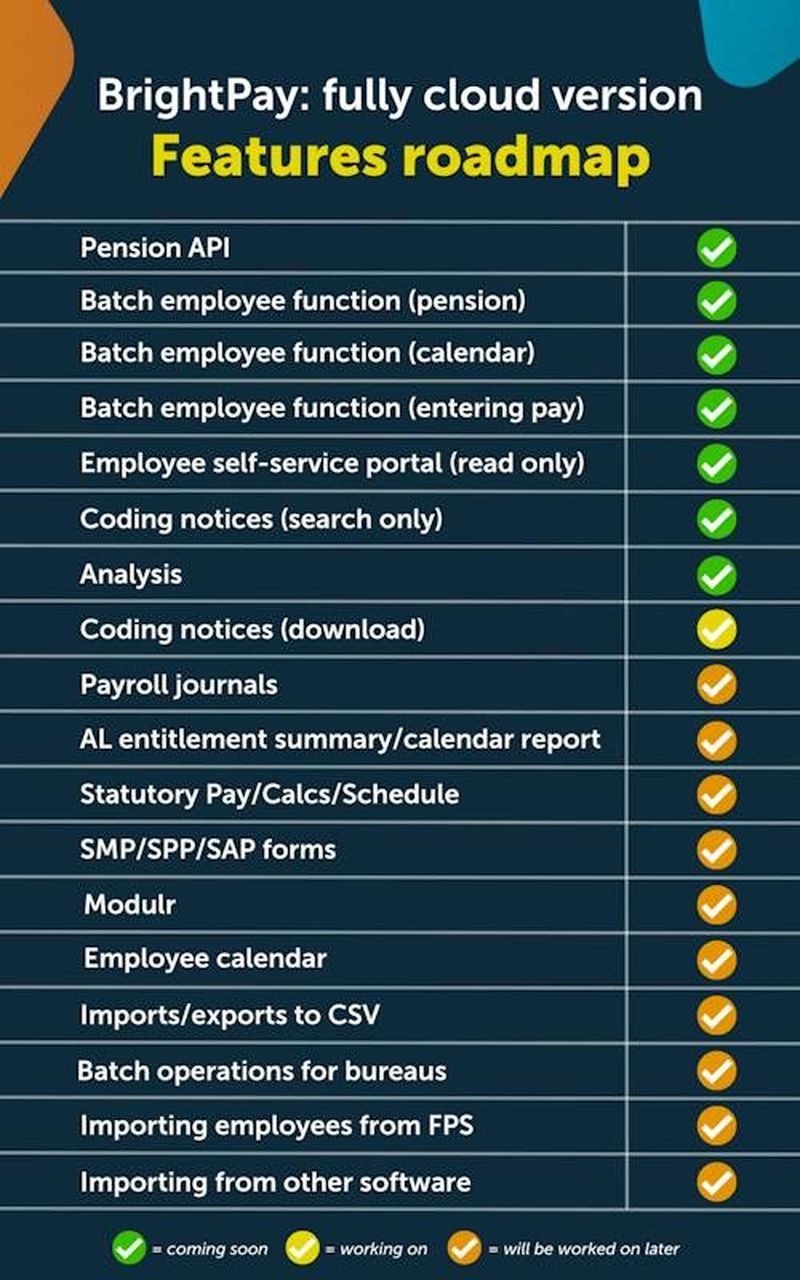
At BrightPay, we’re working incredibly hard behind the scenes to provide as many time-saving features as possible to streamline your payroll workflow. Here is a quick chart that outlines what will be available as of 22nd March, 2023. As you can see from the key guide at the bottom of the graph, the green ticks indicate the features that will be available upon initial release. The yellow ticks are what we’re currently working on. The orange ticks are features that we plan to work on, once the features ticked in yellow are released.
BrightPay features: desktop vs cloud
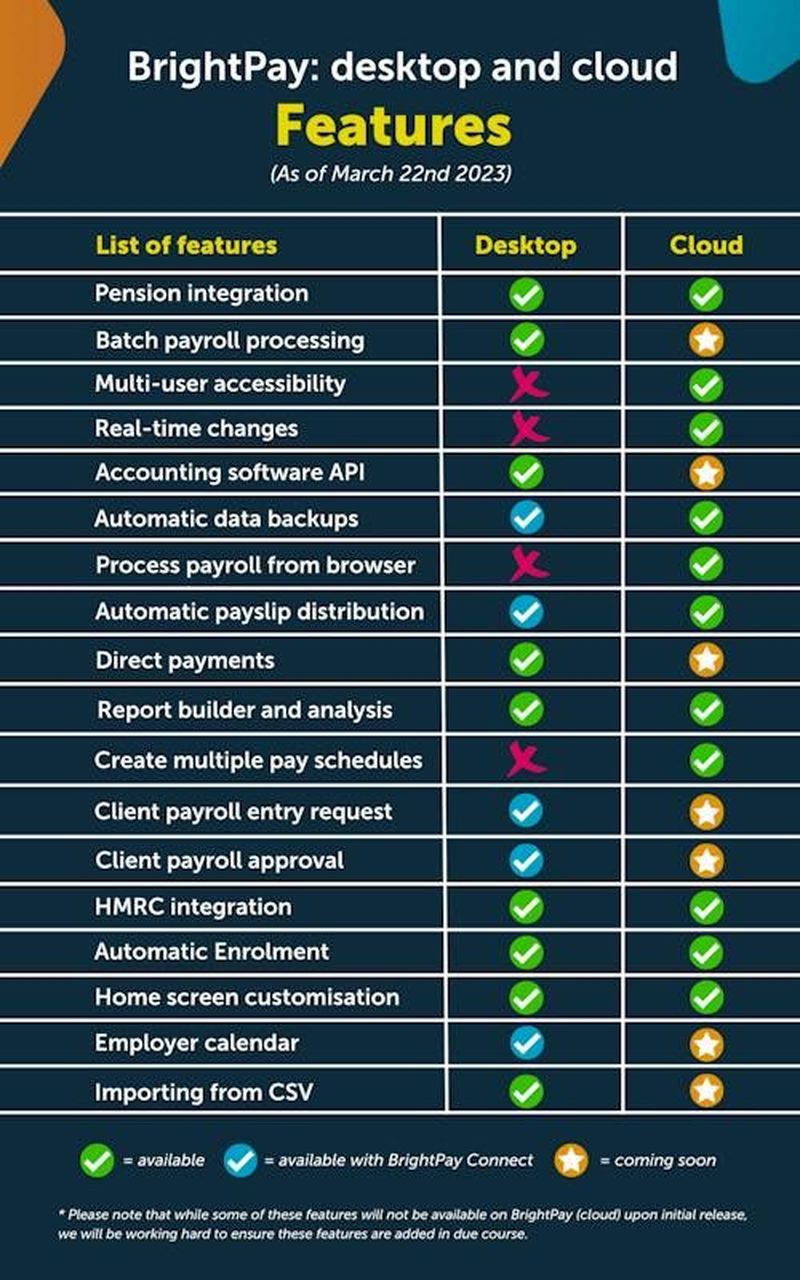
We’re delighted to be releasing our cloud payroll solution and all of the benefits that come with it – from multi-user accessibility to real-time changes. However, there are some features available in BrightPay for Windows or Mac that won’t be available in BrightPay’s cloud solution upon its initial release. We want to assure you that these features are in the pipeline, and we will be adding them to the software as soon as we can.
Here is a list of features that will be available from 22nd of March. In the chart, you can see which features are available on BrightPay for Windows or Mac and BrightPay’s cloud solution. The green ticks mean that the feature is available. The blue tick means that the feature is currently available if you use our cloud-extension, BrightPay Connect. The orange tick means that it is in the pipeline, to be released at a later date. The red X means indicates cloud-based features that won’t be available on the desktop.
Hopefully we’ve shed some light on what features our cloud-based solution will have. If you’re thinking of moving your payroll to the cloud, you can migrate your payroll data from BrightPay for Windows or Mac to our new cloud solution, quickly and easily – with 3 simple steps. And as we mentioned, the user interface is almost identical to the desktop-based software, meaning there’s no need to be trained in the new software.
Learn more about BrightPay (cloud)
This content may have been developed with the assistance of AI tools. Content is reviewed by a member of the Bright team before publication. Guidance on legislation can be obtained from your industry body.
Talk to our team
See how Bright can help your practice.